AI Character Creator vs Sprite Sheets: What’s Actually Happening
Clarifies the differences between AI character creators and sprite sheet workflows in terms of control and game readiness.

These two tools get treated like competitors. Forum threads debate which one to use. Tutorials position them as alternatives. The debate is built on a false premise.
An AI character creator and a sprite sheet are not substitutes. They operate at different stages of the same pipeline. Choosing between them is not a real decision. You need both, in the right order, or your characters never reach a playable state.
Most creators searching for tools in this space hit the same wall: they generate a great-looking character, try to get it moving in their game, and realize no one explained the three steps in between. This article maps the full picture — what each tool actually produces, what connects them, and why the pipeline matters more than any individual tool you pick.
If you are evaluating AI game development tools and trying to understand what you actually need, start here.
What an AI Character Creator Actually Produces
The name implies a finished product. It is not.
An AI character creator generates a structured character designed to be animated — not a finished animation. That distinction matters. A standard AI image generator optimizes for how something looks. An AI character creator optimizes for how something looks across multiple frames — consistent proportions, repeatable structure, poses that translate cleanly into motion without visual drift between frames.
Without that underlying structure, animation generation breaks down. Limbs shift between frames. Proportions drift. The character's silhouette changes in ways a game engine cannot interpret as smooth motion. What looked like a character becomes a sequence of loosely related images with no coherent animation state.
An AI character creator is the input layer of the pipeline. Its job is to solve the consistency problem before animation ever begins. It does not produce animation. It produces something that can be animated — which is a different thing, and an essential one.
This is where most early-stage creators lose time. They generate a character they like, assume it is ready to use, attempt to bring it into a game, and discover that a still image has no walk cycle. No idle. No attack sequence. The character creator did not fail. The pipeline was simply not finished.
Understanding what the character creator produces tells you exactly what still needs to happen.
What a Sprite Sheet Actually Is
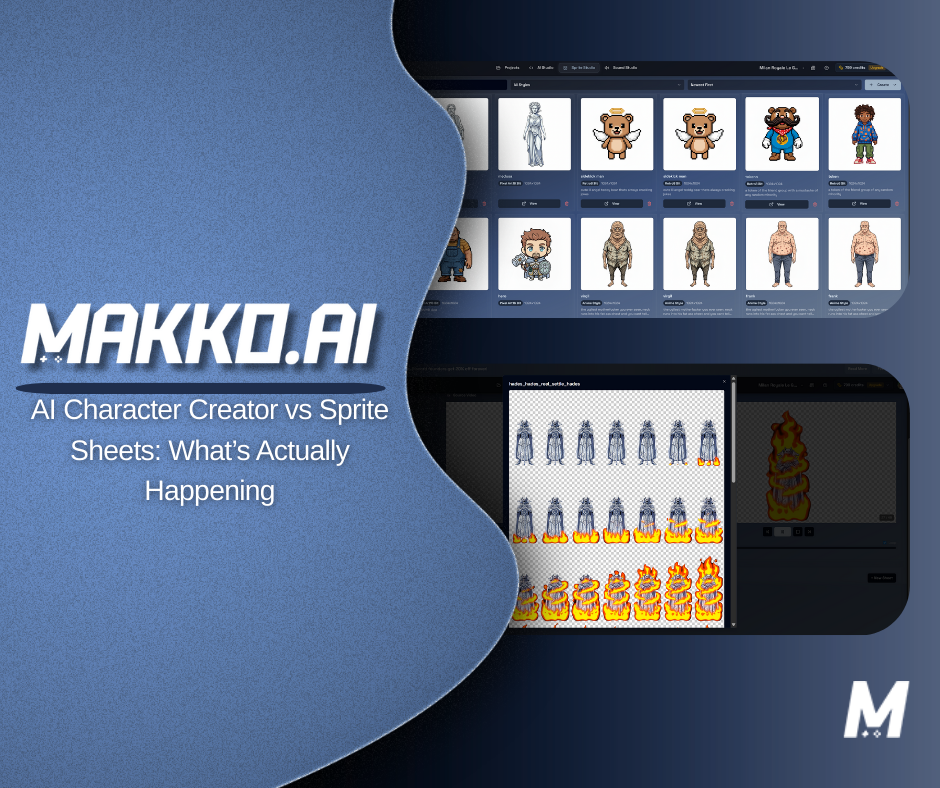
A sprite sheet is a grid of animation frames stored in a single image file. Each frame represents one moment in an animation sequence. Together, those frames form an action — a walk cycle, a run, an idle loop, an attack, a death sequence.
Games use sprite sheets because they do not play video. They play animation states. A character in a game is not running through a pre-recorded clip — it is switching between discrete states based on player input, game events, and logic conditions. The game engine reads the sprite sheet, selects the right frame range for the current state, and displays those frames in sequence at a defined frame rate.
This is fundamentally different from video. Video plays linearly. A sprite sheet is indexed. Any frame or frame range can be called at any moment by a state machine responding to live conditions. That responsiveness to logic is what makes sprite sheets the delivery format for game animation — and why no amount of video generation solves the problem they solve.
A single game character might require eight or more sprite sheets: idle, walk, run, jump, fall, attack, hit reaction, death. Each maps to an animation state in the game's logic layer. Each needs to be visually consistent with every other in proportions, scale, and framing — otherwise the character pops between actions in a way players immediately notice.
Sprite sheets are not deliverables you produce and forget. They are the format your game logic reads at runtime to render motion.
The Step Most Tools Skip
Here is where most explanations of this topic go quiet. They show you a character creator. They show you a sprite sheet. Then they move on — as if the two connect automatically.
They do not. There is a step in between: animation generation.
Animation generation is the process of taking a structured character and producing the individual frames for each animation state. Walk cycle frames. Idle frames. Attack frames. These are what actually get assembled into a sprite sheet. Without this step, you have a character and a format but nothing to put in the format.
Most standalone tools handle one layer of this and hand off to the creator for the rest. A character creator gives you a structured visual. A sprite sheet generator takes frames you already have and packs them into a usable file. An animation tool takes an existing character and generates frame sequences. These are often sold as separate products, which is why creators end up managing three or four tools trying to stitch a pipeline together manually.
The full pipeline looks like this:
- Character Creation — Generate a character with consistent proportions and structure, animation-ready from the start
- Animation Generation — Produce frame sequences for each action state: idle, walk, run, attack, and so on
- Sprite Sheet Assembly — Pack those frame sequences into properly formatted sprite sheets using a sprite sheet generator
- State Binding — Connect sprite sheets to animation states in the game's logic layer so they respond correctly to player input and game events
Skipping any step breaks the pipeline. The character creator cannot skip animation generation and expect the sprite sheet assembler to fill the gap. Each step depends on what came before it.
How the Tool Landscape Handles This (And Where It Falls Short)
Most tools in this space handle one or two layers of the pipeline well, then hand off to the creator for the rest.
Asset-first tools are strong at generating and animating individual sprites and exporting clean sprite sheets for Unity, Godot, or GameMaker. Output quality is high. But the pipeline ends at export. You take the sprite sheet, open your game engine, manually import it, configure the animation controller, set frame ranges, define state transitions, and wire everything to your game logic. The asset work is done. The integration work is just beginning.
Platform-based builders cover more of the pipeline — generating a character, animating it, and building game code in one session. The gap is that most operate on a per-session, per-asset basis without maintaining project-wide state awareness across your game's full system. Iterate on a character design and you rebuild the animation pipeline from that point forward — manually.
The missing layer across almost every tool in this space is agentic AI that holds the entire project in state and coordinates character creation, animation generation, and game logic together as a connected system — not sequentially with manual handoffs, but as an orchestrated workflow where changing one thing propagates correctly through the others. This is the difference between having tools and having a workflow.
What "Game-Ready" Actually Means
"Game-ready" gets applied to almost every AI-generated asset. It is worth being precise about what it actually requires.
A character image is not automatically game-ready. A sprite sheet is not automatically game-ready. Game-ready assets must meet specific technical requirements that go beyond visual quality.
Consistent dimensions across frames. Every frame in an animation sequence must be the same pixel dimensions. If frame 3 is a different size than frame 7, the character will visually jump during playback.
Predictable timing. Frame rate and frame count must be defined and consistent within each animation state, and compatible with the game engine's animation controller.
Transparent backgrounds. Sprites must be isolated with clean alpha channel handling. Edge artifacts cause visual bleed when the character renders over game backgrounds.
Cross-sheet visual consistency. The walk cycle sheet and the attack sheet need to look like they come from the same character. Proportional drift between sheets is immediately visible and breaks immersion.
Engine-compatible format. Sprite sheets need to be structured in a format the game engine can parse — correct grid layout, naming conventions, and optionally a matching atlas or JSON file for frame mapping.
Visual quality and technical game-readiness are different requirements. A beautiful character that fails any of these technical criteria still has to be reworked before it runs in a game.
AI Character Creator vs Sprite Sheets: Side by Side
| Aspect | AI Character Creator | Animation Generation | Sprite Sheet |
|---|---|---|---|
| Purpose | Generate animation-ready character structure | Produce frame sequences per action | Deliver animation to the game engine |
| Output | Structured character visual | Individual frames per animation state | Packed image grid, engine-ready |
| Game interaction | Indirect — feeds animation layer | Indirect — feeds sprite sheet assembly | Direct — read by engine at runtime |
| Replaces others? | No | No | No |
| Where most tools stop | After character export | After frame delivery | After file export |
| Gap cost | Manual animation pipeline setup | Manual sprite sheet assembly | Manual engine integration and state binding |
Where AI Genuinely Accelerates This Pipeline
The value of AI in this workflow is not that it eliminates the pipeline. It is that it accelerates each stage and — in the best implementations — connects them.
At the character creation stage, AI allows rapid iteration that would take a skilled pixel artist hours to produce manually. A creator can go from concept description to animation-ready character structure in a fraction of the time — and iterate on that character without rebuilding everything downstream.
At the animation generation stage, AI removes what used to be the hardest technical barrier for non-artists: drawing frame-by-frame. Walk cycles, idle loops, and attack sequences that required animation skill or expensive outsourcing can now be generated from a description of the motion. The result is not always perfect on the first pass, but it gives creators something to iterate on — which is far faster than starting from nothing.
At the sprite sheet assembly stage, a sprite sheet generator removes the tedious work of arranging, sizing, and exporting frames into the correct grid format. What used to require manual frame ordering and custom export configuration can be handled automatically.
The places where AI creates the most leverage are the connective steps — the handoffs between stages that previously required manual intervention. An agentic AI system that holds project state can pass a character from creation through animation generation through sprite assembly without the creator managing the handoffs. When you iterate on the character, the downstream pipeline updates with it instead of requiring a manual rebuild.
This is where agentic game development changes the equation. Not by replacing the pipeline steps, but by eliminating the manual overhead between them.
Why Sprite Sheets Are Still the Standard
There is a reasonable question worth addressing directly: as AI generation gets faster, why not generate animation frames in real time during gameplay instead of pre-baking them into sprite sheets?
The answer is runtime performance. Sprite sheets are pre-rendered. Displaying them is a texture lookup operation — computationally inexpensive and consistent in timing. Real-time AI generation during gameplay introduces unpredictable latency, hardware dependency, and inconsistency that is incompatible with the precise, state-driven animation systems games require.
Sprite sheets also give developers precise control. You define exactly how many frames a walk cycle has. You define the frame rate. You define how the animation loops. A state machine can call any frame range at any moment in response to any game event, with frame-perfect timing. That level of control is not available with generated video or real-time output.
AI changes how sprite sheets are created. It does not change why they exist. Even in fully AI-native game development workflows, sprite sheets remain the delivery format because they are what game engines are designed to read.
How an AI-Native Workflow Connects Everything
Understanding the pipeline in theory is useful. Having a workflow that executes it without manual stitching is what actually moves a game forward.
In a traditional setup, even with AI tools at each stage, a creator is still doing all of this manually: exporting the character, importing it into an animation tool, generating frame sequences, exporting those frames, importing them into a sprite sheet generator, configuring the layout, exporting the sheet, importing it into a game engine, setting up the animation controller, defining state transitions, and connecting those states to game logic. Each handoff is a chance for something to break.
In an AI game development studio built around state awareness, these handoffs are managed by the system. The character creator, animation generator, and sprite sheet assembler are not separate products requiring separate import and export operations. They are connected stages within a single project context the AI maintains across your entire development session.
When you update a character, the animation pipeline can regenerate from that change. When your game logic changes how an animation state is triggered, the system understands that context. When you are iterating on a walk cycle, the system knows which character it belongs to, which game project it lives in, and what the downstream dependencies are.
This is the practical difference between prompt-based game creation with a connected system and prompt-based asset generation with manual pipeline management. The pipeline steps are the same. The overhead between them is not.
The Honest Summary
AI character creators and sprite sheets are not in competition. They never were. One is the starting point of an asset pipeline. The other is the delivery format at the end of it. Treating them as alternatives creates a gap in the middle where most game development projects stall.
The gap is animation generation — the middle step that most tool comparisons skip. Without it, you have a structured character and a format to put frames into, but no frames to put anywhere.
AI accelerates every stage of this pipeline. The tools that do it well are the ones that understand what stage they occupy and what they hand off to next. The systems that do it best are the ones that remove the handoffs entirely — keeping project state, maintaining visual consistency across the pipeline, and coordinating character creation, animation generation, and game logic as a single connected workflow.
Understanding the pipeline is what separates creators who produce characters from creators who ship playable games.
Related Reading
- How to Add Animated Characters to a Game Using Makko
- Makko Sprite Studio Props Generator: A Pipeline Efficiency Guide
- How Agentic AI Chat Builds Game Logic
- State Awareness vs One-Shot Prompts: Why Your AI Game Logic Keeps Breaking
- What Is Agentic AI in Game Development?
- AI Game Generator vs Game Engine: What You're Actually Choosing