
The Sprite Sheet Spec: Frame Size, Budgets and Memory
Frame size first, then budgets, then layout, then sheet size. The arithmetic, the memory table and a blank version to copy.
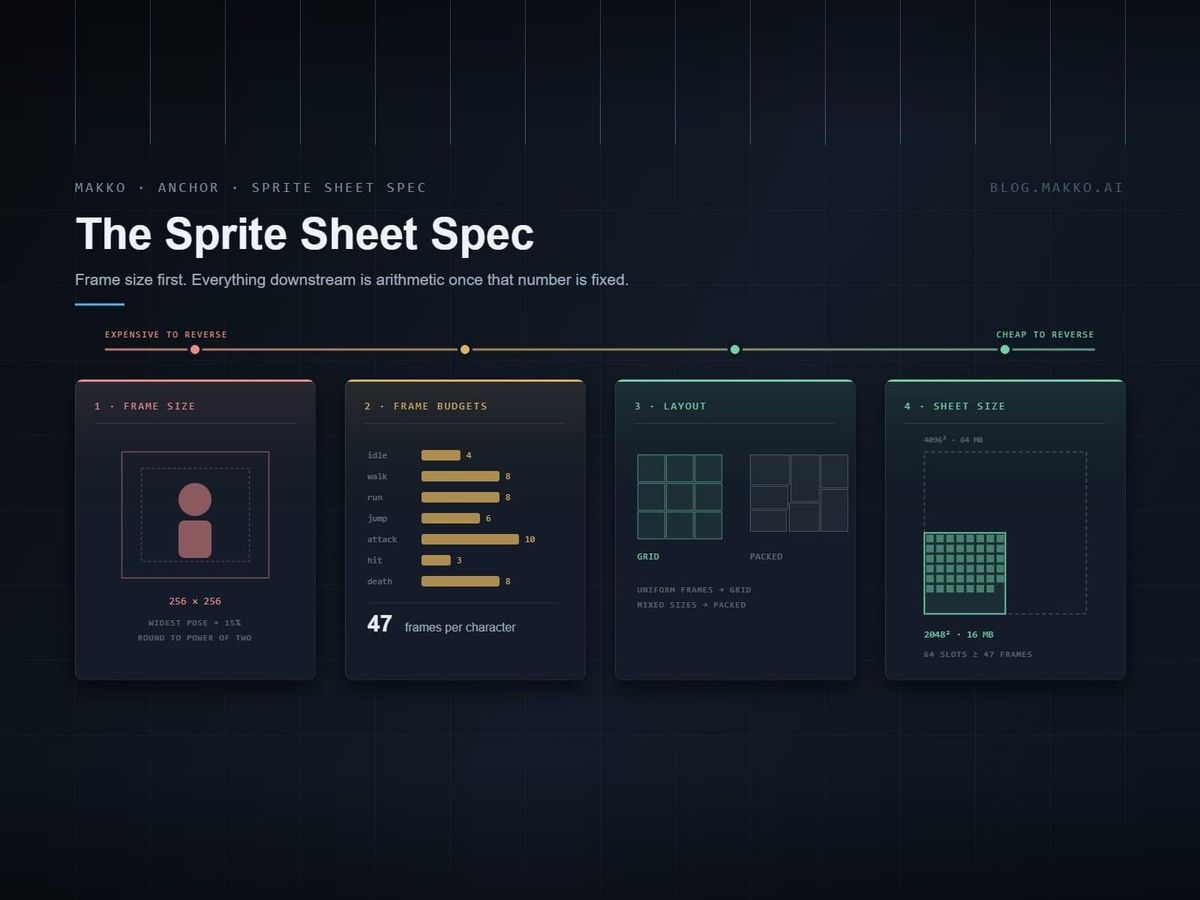
This is the sprite sheet spec we bake 2D characters against. Every number in it is either arithmetic you can check yourself or a figure from engine documentation, and there is a blank version at the bottom to copy into your own project.
It exists because sheet decisions are made in the wrong order almost every time. People pick a sheet size first, because that is the question forums argue about, then discover the frame size they wanted does not divide into it. Frame size comes first. Everything downstream is arithmetic once that number is fixed.
How the numbers here were produced
Two sources, kept apart on purpose.
Arithmetic is arithmetic. Memory figures are width times height times four bytes for uncompressed RGBA8. Slot counts are integer division. You can verify every one of them with a calculator, and you should, because the numbers that matter are the ones you can reproduce.
Engine behavior comes from the official documentation for Godot, Unity, Phaser, GameMaker and RPG Maker, quoted rather than paraphrased where the exact wording decides something.
What we did not do is publish a recommended sheet size and call it a standard. The right size depends on your frame size and your memory budget, and both of those are yours.
The four decisions, in order
| # | Decision | Depends on | Cost to reverse later |
|---|---|---|---|
| 1 | Frame size | On-screen render size, plus headroom | Very high. Every asset rebakes. |
| 2 | Frame budget per animation | Genre and readability | Moderate. Per-animation regeneration. |
| 3 | Layout: grid or packed | Whether frame sizes vary | Low. It is a build step. |
| 4 | Sheet size | Frame size and memory budget | Low. Repack and reimport. |
The ordering is the whole point. Decisions one and two are expensive and belong in a document. Decisions three and four are cheap and belong in a build script.
1. Frame size
Start from the size the character renders at on screen, then add headroom for the poses that exceed the idle silhouette.
A character that stands roughly 128 pixels tall in game needs a frame taller and wider than 128. An attack extends a weapon. A jump raises the knees and lowers the feet. A hit reaction throws the torso back. Bake at the idle bounding box and every one of those poses gets clipped.
The working rule: take the widest and tallest pose in the set, add 15 percent, then round up to the nearest power of two. For a 128-pixel character that usually lands on 256×256.
| On-screen height | Typical frame size | Notes |
|---|---|---|
| 16–32 px | 64 × 64 | Classic pixel art scale. Detail floor arrives fast. |
| 32–64 px | 128 × 128 | Comfortable for most top-down games. |
| 64–128 px | 256 × 256 | The common case for a 2D action character. |
| 128–256 px | 512 × 512 | Side-scrollers with large characters, boss sprites. |
| 256 px and up | 1024 × 1024 | Key art, cutscene figures. Rare in a gameplay sheet. |
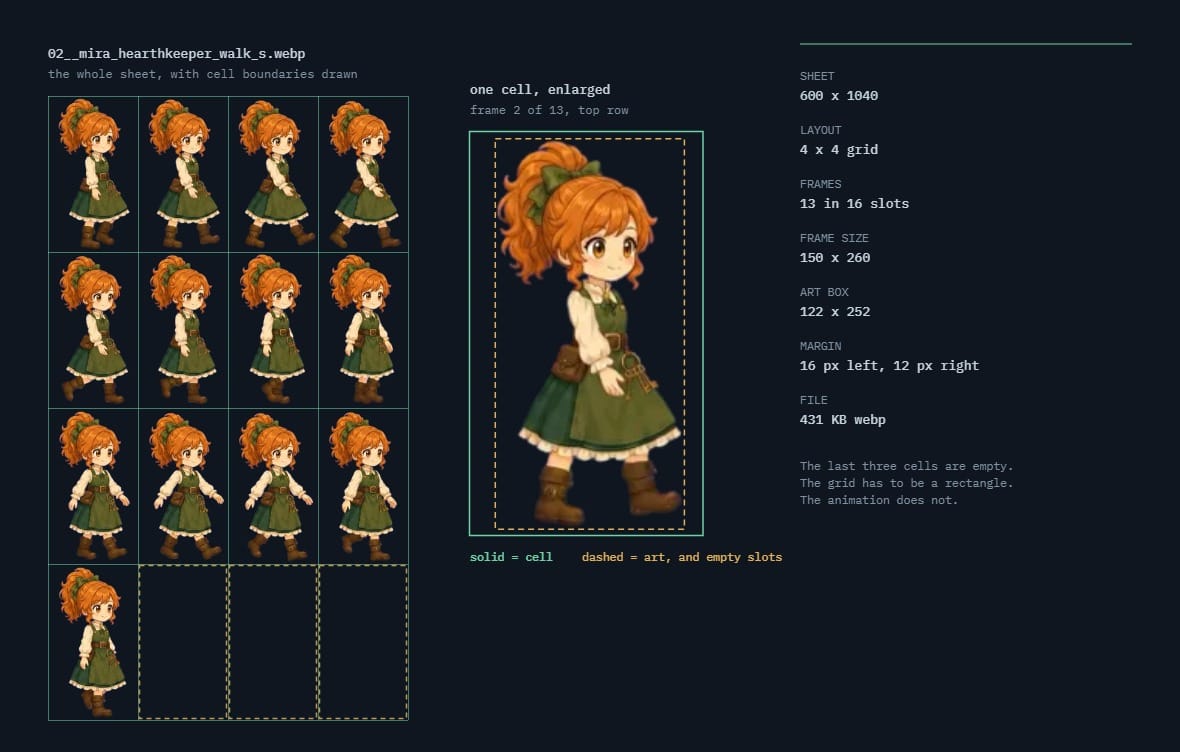 02__mira_hearthkeeper_walk_s.webp600 × 1040 · 4 × 4 grid · 13 frames in 16 slots · 431 KB
Powers of two are not required by any modern engine. They are convenient because they divide into sheet dimensions without remainder, which keeps slot counts whole and packing trivial. Choose a non-power-of-two frame only when you have a specific reason and have checked the division.
The rule that makes everything else work
Every animation belonging to one character has to place the character identically. Same frame height, same ground line, same horizontal center. The simplest way to guarantee it is to bake every animation at identical frame dimensions, so idle, walk, run, jump, attack, hit and death all come out of the same rectangle, empty space included.
Break this and the sprite shifts position on screen the moment the animation changes, and you will spend an afternoon looking for the bug in your movement code.
Cells still have to be uniform inside a single sheet, because that is what a grid means. Across sheets there is more room than the rule suggests. If you bake one animation per sheet, the frame width can differ between them, provided the bake centers on the character rather than on the canvas. Verify that rather than assuming it: measure the gap from the bottom of the art to the bottom of the cell, and the offset from the center of the art to the center of the cell, and check that both hold within a pixel or two across the whole set. A sheet that drifts on the second number will move your character sideways when the animation changes.
2. Frame budgets
These are the counts that read clearly without wasting generation on frames nobody perceives.
| Animation | Frames | Loops | Note |
|---|---|---|---|
| Idle | 4 | Yes | Breathing or a weight shift. First frame must equal last. |
| Walk | 8 | Yes | Two full steps. Four reads as a shuffle. |
| Run | 8 | Yes | Same cycle length, longer stride, more airtime. |
| Jump | 6 | No | Split as launch, rise, apex, fall, land. |
| Attack | 10 | No | Wind-up, strike, recovery. The strike is one or two frames. |
| Hit | 3 | No | Short on purpose. It has to clear before the next input. |
| Death | 8 | No | The only animation whose last frame differs from its first. |
Total: 47 frames per character. That figure drives everything in the next two sections, so it is worth carrying.
Attack frame counts have a documented floor elsewhere. Battle for Wesnoth's public art document asks for at least four frames on an attack and calls six optimal, which lines up with the ten above once you count wind-up and recovery separately from the strike.
3. Layout: grid or packed
A grid sheet is a uniform lattice. Every cell the same size, frames addressed by row and column, no metadata file. Engines read these natively with nothing but a frame count.
A packed atlas arranges frames of arbitrary size to minimize waste and ships a metadata file mapping names to rectangles. More efficient, and necessary once frame sizes genuinely vary, but now two files have to stay in sync.
| Use a grid when | Use a packed atlas when |
|---|---|
| One character, one frame size | UI icons, effects, mixed props |
| You want zero metadata to maintain | Frame sizes vary by more than about 30 percent |
| The engine reads it with a frame count alone | You already run a packing step in the build |
For a single character with a consistent frame size, the grid is almost always right. The packing gain on uniform frames is zero by definition, and you have added a file that can go stale.
4. Sheet size
Two constraints. One stopped mattering years ago. The other still binds.
Hardware support, which is not your problem
4096×4096 is supported by every WebGL2 device reporting in the wild. 8192 covers roughly 97 percent, and on WebGPU 8192 is the floor the specification guarantees rather than a gamble. The advice to stay under 2048 dates from a decade ago and costs you texture binds for nothing.
Memory, which is
An uncompressed RGBA8 texture costs width times height times four bytes, resident in video memory, regardless of how much of the sheet you filled.
| Sheet | Uncompressed | Block compressed (4:1) | 256 px slots |
|---|---|---|---|
| 1024 × 1024 | 4 MB | 1 MB | 16 |
| 2048 × 2048 | 16 MB | 4 MB | 64 |
| 4096 × 4096 | 64 MB | 16 MB | 256 |
| 8192 × 8192 | 256 MB | 64 MB | 1024 |
Block-compressed formats, ASTC on mobile and BC on desktop, typically cut texture memory by a factor of four. That is the difference between a sheet costing 64 MB and costing 16.
The worked example
One character. 47 frames at 256×256. The pixels themselves come to 11.75 MB.
A 4096×4096 sheet holds 256 slots and costs 64 MB. You would use 47 of them and pay for all 256.
A 2048×2048 sheet holds 64 slots and costs 16 MB. Your 47 frames fit with room to spare.
Pick the smallest power-of-two sheet whose slot count exceeds your frame count. That is the whole calculation, and it takes thirty seconds on paper before you bake anything.
| Frame size | Slots on 2048 | Slots on 4096 |
|---|---|---|
| 64 × 64 | 1024 | 4096 |
| 128 × 128 | 256 | 1024 |
| 256 × 256 | 64 | 256 |
| 512 × 512 | 16 | 64 |
| 1024 × 1024 | 4 | 16 |
Padding and bleed
Bilinear sampling reads neighboring pixels, so a frame can pull a sliver of the frame beside it. Two rules prevent it.
Padding: two transparent pixels between cells, minimum. This is enough for bilinear filtering at 1:1 and near-1:1 scales.
Bleed: extrude the edge pixel outward into that padding when the sprite will be scaled or mipmapped. Padding alone leaves transparent pixels to sample, which reads as a dark fringe; extruding gives the sampler the sprite's own color to find instead.
If you are not scaling and not mipmapping, which describes a lot of 2D sprite work, padding alone is sufficient.
No padding
Bilinear sampling reads neighboring pixels, so a frame pulls a sliver of the frame beside it. The orange edge shows up inside the blue sprite.
Padding only
Two transparent pixels stop the neighbor bleeding in. But when the sprite is scaled, the sampler now finds transparency at the edge and darkens it.
Padding + extrude
Extrude the edge pixel outward into the padding. The sampler finds the sprite’s own color instead of transparency, at any scale.
Grouping: how many characters per sheet
A sheet loads and unloads as one unit. That single fact decides the grouping rule.
Put every character on one giant texture and a scene showing one of them pays memory for all of them. Split every character onto its own sheet and a crowded scene pays a texture bind per character. Neither extreme is right.
Group by what appears on screen at the same time. A game with a handful of characters wants one sheet per character. A game with a large roster where only four fight at once wants one sheet per encounter cast. A tileset wants one sheet per biome, because that is the unit a room loads.
The test: if loading a sheet pulls in mostly things you are about to draw, the grouping is right. If it pulls in a boss you will not meet for three hours, it is not.
One giant sheet
A sheet loads as a unit. A scene showing one character pays memory for all twelve.
One per character
Fine when few characters share a scene. In a crowd it costs a texture bind each.
One per encounter
The four who fight together on one sheet, the rest of the roster elsewhere. One bind, nothing idle in memory.
This interacts with sheet size in a way that is easy to miss. Grouping four characters onto one 4096×4096 sheet at 64 MB is cheaper than four separate 2048×2048 sheets at 16 MB each only if all four are on screen together. If they are not, the four small sheets win, because you load one at a time.
Naming
One convention, applied without exception:
character_animation_frame.png, for example hero_run_03.png
Lowercase, underscore separated, frame numbers zero padded to two digits so they sort correctly. The reason for zero padding is that hero_run_10 sorts before hero_run_2 in every file browser and most packing tools, which silently reorders your animation.
Two engines add requirements on top. GameMaker requires the frame count in the filename as a _stripN suffix, and strips that suffix on import. RPG Maker uses $ and ! prefixes to change how a sheet is interpreted.
Engine import, in one line each
One line each here, because the detail belongs in its own piece. Sprite sheet formats by engine walks the same five importers properly, including what each one does with a frame count that does not fill the grid.
| Engine | Grid sheet import |
|---|---|
| Godot | Set Hframes and Vframes on a Sprite2D, or use "Add frames from a Sprite Sheet" in SpriteFrames. |
| Unity | Sprite Mode: Multiple, then slice in the Sprite Editor by cell size or cell count. |
| Phaser | load.spritesheet() with frame width and height. |
| GameMaker | Filename must end _stripN where N is the frame count. Horizontal strips only. |
| RPG Maker MV/MZ | Fixed layout: 4 × 2 character slots, each a 3 × 4 pose grid. |
Acceptance checklist
Six questions, all answerable with the file open. No scene, no build.
- Do all animations for this character share one frame size?
- Does the frame count fit the sheet's slot count with the sheet one size smaller than you assumed?
- Is there at least two pixels of transparent padding between cells?
- If the sprite will be scaled, is the edge pixel extruded into that padding?
- Is the first frame of every looping animation identical to its last, death excepted?
- Are frame numbers zero padded so they sort in order?
The blank version
Copy this and fill in your own figures.
| Field | Your value |
|---|---|
| On-screen character height | ___ px |
| Frame size (widest pose + 15%, rounded up) | ___ × ___ |
| Animation set and frame counts | ___ |
| Total frames per character | ___ |
| Layout (grid or packed) | ___ |
| Sheet size (smallest power of two that fits) | ___ × ___ |
| Memory cost per sheet | ___ MB |
| Compression (ASTC / BC / none) | ___ |
| Padding / bleed | ___ px / yes-no |
| Naming pattern | ___ |
Frequently asked questions
What size should a sprite sheet be?
The smallest power-of-two sheet whose slot count exceeds your frame count. For one character with 47 frames at 256×256, that is 2048×2048 at 16 MB rather than 4096×4096 at 64 MB. Hardware support is not the constraint, since 4096 works on every WebGL2 device in the wild.
Do all frames need to be the same size?
For a uniform grid, yes, since that is what makes indexing work. For a packed atlas the metadata carries each rectangle, so sizes can vary. Even with an atlas, keep one character's animations at a single frame size or the sprite jumps between states.
How many frames does each animation need?
Idle 4, walk 8, run 8, jump 6, attack 10, hit 3, death 8. That comes to 47 for a standard action character. Attacks have a documented floor of four frames with six considered optimal.
How much padding between frames?
Two transparent pixels minimum. Add edge extrusion on top of that if the sprite will ever be scaled or mipmapped, because padding alone gives the sampler transparent pixels to pull in.
Should I use powers of two?
No engine requires it any more. Use them anyway, because they divide into sheet dimensions without remainder and keep slot arithmetic whole.
How do I know if my sheet size is costing me?
Multiply width by height by four. That is the uncompressed cost in bytes, resident whether or not you filled the sheet. If the number surprises you, the sheet is too big.