What Size Should a Sprite Sheet Be? Limits by Target, 2026
The advice to stay under 2048 is a decade out of date. Current device-support data, the memory arithmetic that actually constrains you, and how to pick a sheet size from your frame size.
Search this question and you will land on forum answers from 2015 telling you to stay under 1024×1024, or 2048 if you are feeling brave. That advice was reasonable when it was written. It is now wrong by roughly an order of magnitude, and following it will cost you draw calls for no reason. The frame budget this sits on top of is worked out in the sprite sheet spec.
Here are the current numbers, where they come from, and the constraint that actually binds. It is not the one most guides talk about.
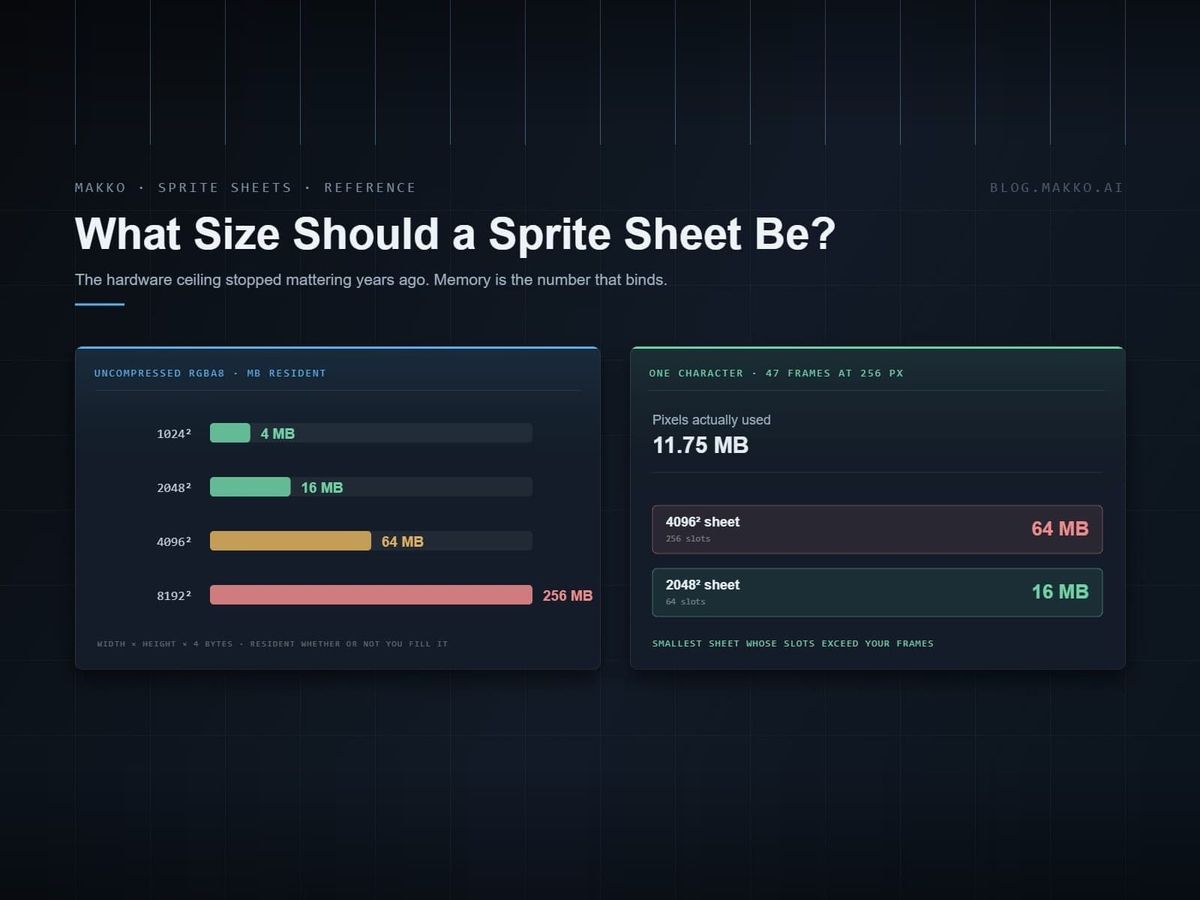
The short version. 4096×4096 is supported by 100% of WebGL2 devices in the wild and is the safe default for almost every 2D game. 8192 covers 97%. The hardware ceiling stopped being the real limit years ago. Memory is. A single uncompressed 4096×4096 RGBA sheet costs 64 MB of VRAM, and that is the number that should be driving your decision.
What devices actually support
The Web3D Survey tracks the reported MAX_TEXTURE_SIZE parameter across real browsers and devices. For WebGL2:
| Max texture dimension | Share of devices | Practical read |
|---|---|---|
| 4096 | 100% | Universal. Ship this with no compatibility caveat. |
| 8192 | 97% | Safe unless you are deliberately targeting very old hardware. |
| 16383 | 84% | Fine for desktop-first titles. Note the odd value: some drivers report one less than 16384. |
| 16384 | 83% | Desktop and recent mobile. |
| 32768 | 1% | Effectively nonexistent. Do not plan around it. |
The 16383 row is worth a second look. Some drivers report a maximum that is one pixel short of the power of two, so code that asserts size === 16384 will fail on a real slice of hardware. Compare with >=, not ===.
WebGPU
WebGPU specifies guaranteed minimums rather than surveying hardware. Every conforming implementation must support at least:
| Limit | Guaranteed minimum |
|---|---|
maxTextureDimension2D | 8192 |
maxTextureDimension1D | 8192 |
maxTextureDimension3D | 2048 |
maxTextureArrayLayers | 256 |
So on WebGPU, 8192 is not a gamble. It is the floor the spec promises. Browsers report tiered values rather than exact GPU capabilities, partly to limit fingerprinting, so querying the adapter gives you a bucket rather than the true hardware number.
You can read the real reported limits at runtime:
const adapter = await navigator.gpu.requestAdapter();
console.log(adapter.limits.maxTextureDimension2D);
The limit that actually binds
Hardware maximums are a distraction for most 2D games. You will hit your memory budget long before you hit 8192 pixels.
An uncompressed RGBA8 texture costs width × height × 4 bytes:
| Sheet size | Uncompressed RGBA8 | With a full mipmap chain |
|---|---|---|
| 1024 × 1024 | 4 MB | ~5.3 MB |
| 2048 × 2048 | 16 MB | ~21 MB |
| 4096 × 4096 | 64 MB | ~85 MB |
| 8192 × 8192 | 256 MB | ~341 MB |
That is per sheet, resident in video memory, regardless of how much of the sheet is filled. A mostly-empty 4096 sheet costs the same 64 MB as a full one.
Mipmaps add roughly a third again. For 2D sprite work that never scales down, you usually do not want them: they cost memory and can introduce softness at certain zoom levels. Turn them off unless you have a specific reason.
So what size should you use?
Work backwards from the frame, not forwards from the hardware limit.
- Fix your frame size first. Every animation for one character bakes at identical dimensions, which is the rule that makes the rest of the production loop work. If the widest pose needs 640×512, that is the frame size for the whole set.
- Count the frames. A seven-animation set at the budgets that hold up in practice comes to 47 frames: idle 4, walk 8, run 8, jump 6, attack 10, hit 3, death 8.
- Fit them into the smallest power of two that holds them. 47 frames at 640×512 is roughly 15.4 million pixels. A 4096 sheet is 16.7 million, so it only fits if packing is perfect, and packing is never perfect. Two sheets, or a smaller frame size.
The general shape of the answer:
| Project type | Sheet size | Reasoning |
|---|---|---|
| Mobile-first, broad device range | 2048 | 16 MB per sheet. Leaves room for several characters plus backgrounds. |
| Web game (WebGL2 or WebGPU) | 4096 | Universal support, 64 MB. One sheet per character is usually plenty. |
| Desktop, single-character-heavy | 4096, occasionally 8192 | Only go to 8192 if you have measured that you need it. |
| Pixel art at low resolution | 1024 or 2048 | Small frames mean you rarely need more, and the memory saving is free. |
A worked example
Take a single character with the seven-animation set most 2D action games need, and frames of 256×256, a reasonable size for a character that renders around 128 pixels tall on screen.
| Animation | Frames | Running total |
|---|---|---|
| Idle | 4 | 4 |
| Walk | 8 | 12 |
| Run | 8 | 20 |
| Jump | 6 | 26 |
| Attack | 10 | 36 |
| Hit reaction | 3 | 39 |
| Death | 8 | 47 |
A 2048×2048 sheet holds an 8×8 grid of 256-pixel cells, which is 64 slots. Forty-seven frames fit with seventeen spare. Cost: 16 MB.
Double the frame size to 512×512 and the same 2048 sheet holds only 16 cells. Forty-seven frames now need three sheets, or one 4096 sheet at 64 MB.
That is the whole calculation. Do it on paper before you bake anything. Frame size drives sheet size drives memory, and frame size is the expensive one to reverse.
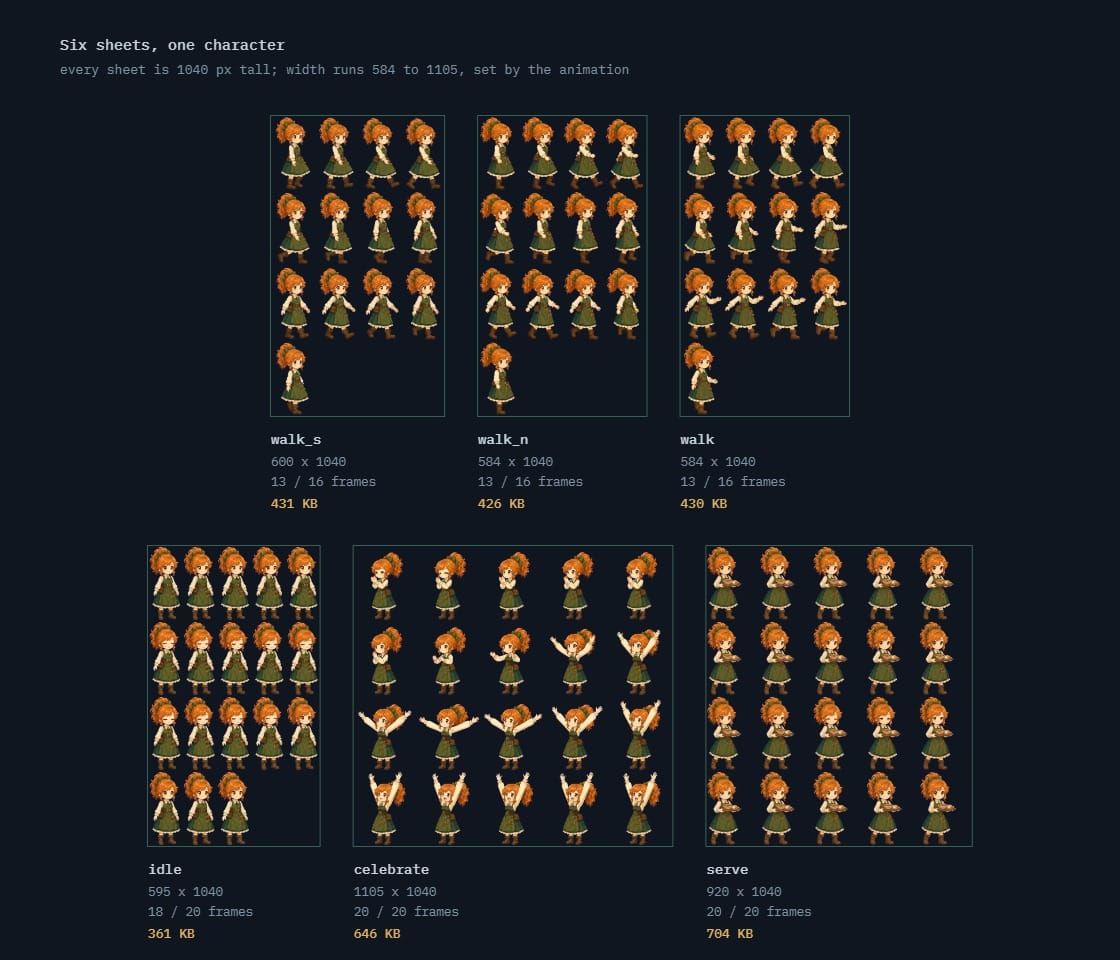 one character, six animations, six sheets361 KB to 704 KB each · about 3 MB for the whole cast member
Other targets, briefly
The WebGL2 and WebGPU numbers above are the best-documented because browsers report them publicly at scale. For native targets the picture is simpler and more generous.
| Target | Practical ceiling | What to plan for |
|---|---|---|
| Desktop (Windows, macOS, Linux) | 16384 on essentially all current GPUs | You will hit your memory budget long before the dimension limit. |
| Modern iOS and Android | Typically 8192–16384 | 4096 is safe without qualification. Test 8192 on your oldest supported device. |
| Older Android, OpenGL ES 3.0 era | Guaranteed minimum 2048, usually higher in practice | If you are genuinely supporting this range, 2048 and measure. |
| Nintendo Switch | Generous dimensions, tight memory | Memory is the binding constraint, not texture size. |
The pattern across all of them is the same: the dimension ceiling stopped mattering a while ago, and the memory ceiling never did.
Compression changes the arithmetic
Everything above assumes uncompressed RGBA8. Block-compressed formats, ASTC on mobile and BC on desktop, typically cut texture memory by a factor of four or more. That is the difference between one character's sheet costing 64 MB and costing 16.
Two caveats for 2D sprite work. Block compression is lossy, and it is least forgiving on exactly the content 2D games have most of: hard edges, flat color regions and sharp outlines. And block formats compress in fixed tiles, so power-of-two dimensions stop being optional. Compress backgrounds and large props first; be careful with pixel art and crisp line work.
Powers of two, and whether they still matter
Modern graphics APIs handle non-power-of-two textures without complaint. The old hard requirement is gone.
Two reasons to keep using them anyway:
- Compressed texture formats generally still expect power-of-two dimensions, and block compression is where the real memory savings live.
- Mipmapping behaves predictably on power-of-two textures and can get awkward otherwise.
If you are not compressing and not mipmapping, which describes a lot of 2D sprite work, a 1920×1088 sheet is fine. Just be aware you are giving up the option later.
Padding and bleed
Whatever size you land on, leave space between frames. Bilinear sampling reads neighboring pixels, and at any scale other than exactly 1:1 that means a frame can pull in a sliver of the frame next to it. The result is a faint edge line that appears only in motion, which makes it maddening to track down.
- 2 pixels of transparent padding between frames handles most cases.
- Extrude the edge pixel outward into the padding, sometimes called bleed, when you are scaling sprites or using linear filtering.
- With nearest-neighbor filtering and integer scaling, padding matters less, but keep it anyway. It costs almost nothing and it survives a later change of filtering mode.
How to lay the sheet out
Size is only half the decision. The other half is arrangement, and there are two conventions.
One row per animation. Idle on row 0, walk on row 1, run on row 2. Human-readable, trivial to debug, and it leaves an unused tail at the end of most rows. You are trading some wasted pixels for the ability to look at the sheet and understand it.
Continuous flow. Frames run left to right and wrap, packed with no gaps, and an index range identifies each animation. Wastes almost nothing and is unreadable at a glance. You will be counting cells with a ruler when something is off by one.
Row-per-animation is worth its waste on any sheet a human maintains. Continuous flow makes sense when the sheet is generated by a tool and nobody opens it. Given that the recommended workflow generates sheets as a build step, either is defensible, but pick one and apply it to every character, because mixing them across a project is how off-by-one bugs appear.
Two conventions worth adopting regardless:
- Keep the frame order stable. Animations in a fixed order across every character means the same index means the same thing everywhere.
- Put the loops first. Idle, walk and run get played constantly. Keeping them in the early rows makes the common case easy to find.
Budgeting a whole scene, not a sheet
Picking a size per sheet is the easy half. The number that actually decides whether your game runs on a five-year-old phone is the total resident texture memory for your worst scene, and almost nobody adds it up until something crashes.
The arithmetic is not hard. Take the scene with the most on screen at once and list what has to be loaded:
| Asset | Sheet | Cost |
|---|---|---|
| Player character | 2048 × 2048 | 16 MB |
| Three enemy types | 2048 × 2048 each | 48 MB |
| Room background | 1920 × 1080, opaque | 8 MB |
| Props and salvage | 1024 × 1024 | 4 MB |
| UI chassis and icons | 1024 × 1024 | 4 MB |
| Effects | 1024 × 1024 | 4 MB |
| Scene total | 84 MB | |
Eighty-four megabytes is comfortable almost everywhere. Now change one decision: bump every character to a 4096 sheet because the frames looked slightly crisper. The four character sheets go from 64 MB to 256 MB and the scene total lands at 276 MB. Same game, same art, one decision, and you have just priced yourself out of a large slice of mobile hardware.
That is why the frame size decision deserves an afternoon. It propagates.
Two rules that keep the total down
- Group sheets by what appears together, not by what is alphabetically adjacent. A sheet loads whole. If your boss and your tutorial NPC share a sheet, every fight loads the tutorial NPC.
- Give backgrounds their own sheet. They are the largest single asset and the one most likely to be swapped when the player changes room. Bundling them with characters means reloading characters you already had.
Where this sits in the pipeline
Sheet size is one line in a larger spec, and it is downstream of a decision made two stages earlier. Frame size is set when you bake the animations; sheet size just follows from it. The full run, with the numbers at every stage, is in the Godot 2D art production spec. Once the size is settled, what each importer asks for is in sprite sheet formats by engine.
Checking the limit yourself
Do not trust a table, including this one, for a platform you are actually shipping on. Query it:
// WebGL2
const gl = document.createElement('canvas').getContext('webgl2');
console.log(gl.getParameter(gl.MAX_TEXTURE_SIZE));
Run that on the oldest device you intend to support, not on your development machine. The gap between the two is usually where the surprise lives.
Frequently asked questions
What is the safest sprite sheet size in 2026?
4096×4096. It is supported by 100% of WebGL2 devices reported in the Web3D Survey, and it costs 64 MB uncompressed. Drop to 2048 if you are targeting a wide range of mobile hardware and want the memory headroom.
Is 2048 still the limit on mobile?
No. That figure comes from OpenGL ES 2.0-era guarantees and has not reflected shipping hardware for years. 4096 is universal in current survey data and 8192 covers 97% of devices.
Do sprite sheets have to be a power of two?
Not for basic rendering on modern APIs. Keep power-of-two dimensions if you plan to use compressed texture formats or mipmaps, since both still expect them.
How much memory does a sprite sheet use?
Width × height × 4 bytes for uncompressed RGBA8, regardless of how much of the sheet is filled. A 4096×4096 sheet is 64 MB. Adding a full mipmap chain increases that by roughly a third.
Should I use a sheet at all, or individual frames?
Ship sheets, work in frames, and generate the sheet as a build step.
Should I use one big sheet or several small ones?
Fewer, larger sheets reduce texture swaps and help batching. But a sheet is loaded whole, so a single enormous sheet holding every character means paying for all of them even in a scene that shows one. Group by what appears on screen together.
How much padding should I leave between frames?
Two transparent pixels as a baseline, plus edge extrusion if you scale sprites or use linear filtering. This prevents the thin seam that bilinear sampling pulls in from neighboring frames.