Sprite Sheet Formats by Engine: Godot, Unity, Phaser, GameMaker, RPG Maker
Every engine is told what a sprite sheet means differently. The reference table, what each metadata format actually contains, and the three things that break when a sheet moves between tools.
A sprite sheet is a grid of frames in a PNG. That part is universal. Everything about how an engine is told what the grid means is not, and that is where the afternoon goes. The frame size and budget decisions that come before this are in the sprite sheet spec.
This is the reference table for the five engines whose formats are worth documenting precisely, plus what the metadata files contain and what breaks when you move between them.
The short version. Two families exist. Grid sheets carry no metadata. You tell the engine how many columns and rows, and it slices. Atlases ship a companion file mapping names to rectangles. Godot and Unity read grids natively and support atlases through their own resource types. Phaser reads both and wants JSON. CSS has no concept of either and needs pixel offsets. Pick grid unless your frames vary in size.
The quick table
| Engine | Grid sheet | Atlas / metadata | What you set |
|---|---|---|---|
| Godot 4 | Native | AtlasTexture resources, one per region | Hframes / Vframes on a Sprite2D, or frame counts in the SpriteFrames sheet importer |
| Unity | Native | Sprite Atlas asset, packed at build | Sprite Mode: Multiple, then slice in the Sprite Editor |
| Phaser | Native | JSON Hash or JSON Array | load.spritesheet() with frame width and height, or load.atlas() with a JSON file |
| GameMaker | Horizontal strips only | Project-internal | Frame count in the filename: name_stripN.png |
| RPG Maker MV/MZ | Fixed 4×2 slots of 3×4 frames | Project-internal | Nothing. Layout is fixed. $ and ! prefixes change behavior |
| CSS | Manual | None | background-position offsets in pixels, per frame |
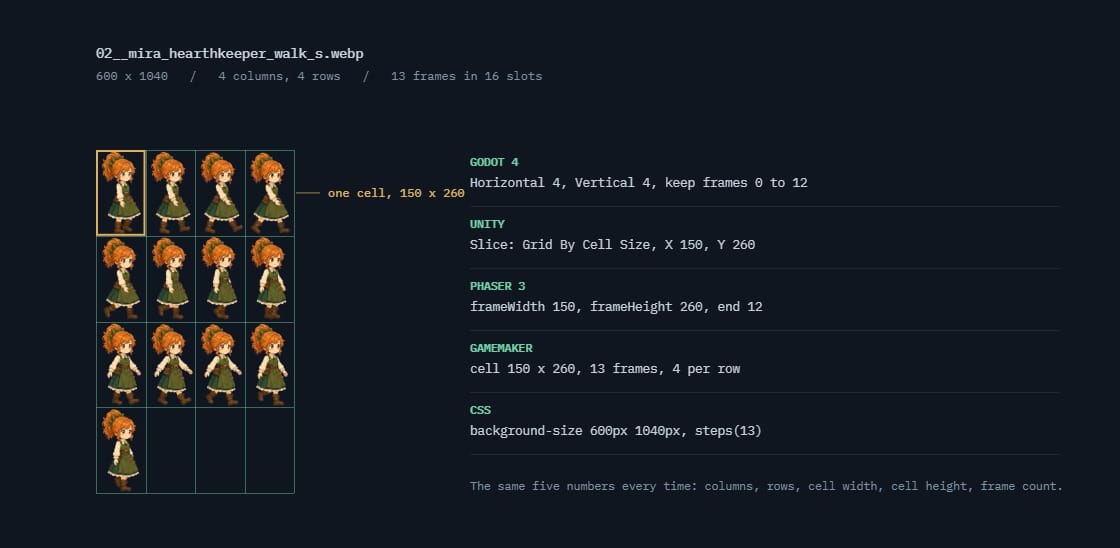 02__mira_hearthkeeper_walk_s.webp600 × 1040 · 4 columns, 4 rows · 13 frames in 16 slots
Godot 4
Godot gives you two paths and they use different data structures, which is the part that confuses people coming from other engines.
Grid, via Sprite2D. Drop the sheet into the node's Texture, expand the Animation section in the Inspector, and set Hframes and Vframes to the number of columns and rows. The Frame property then indexes cells left to right, top to bottom, starting at zero. No metadata file is involved at any point.
Named animations, via AnimatedSprite2D. Create a SpriteFrames resource on the node, open it, and choose Add frames from a Sprite Sheet. You set the horizontal and vertical counts, select which cells belong to this animation, and name it. Repeat per animation.
The difference that matters downstream: SpriteFrames is a saved resource with named animations inside it, so play("run") keeps working if the sheet is repacked. The Sprite2D route addresses frames by integer, so repacking breaks every index.
For genuinely irregular frame sizes, Godot uses AtlasTexture, a resource holding a source texture plus a region rectangle. One per frame, which is verbose enough to avoid unless the packing gain is real.
Unity
Unity treats slicing as an import setting rather than a scene setting, which is a meaningfully different model.
Set the texture's Sprite Mode to Multiple, then open the Sprite Editor and slice: by cell size, by cell count, or automatically. Unity writes the resulting rectangles into the .meta file that sits beside the image.
That .meta file is the thing to know about. It is YAML, it is generated, and it must be committed to version control. A team member who pulls the PNG without the .meta gets an unsliced texture and every sprite reference breaks. This causes more lost time than any other item on this page.
For packing, Unity's Sprite Atlas is a separate asset that gathers sprites and packs them at build time, leaving your source files untouched. This is the model the source-versus-artifact split is built for, and it is the intended path rather than a workaround.
Phaser
Phaser is the most explicit of the four, because everything is a load call with arguments.
For a uniform grid:
this.load.spritesheet('hero', 'hero.png', {
  frameWidth: 256,
  frameHeight: 256
});
Phaser divides the image by those dimensions and indexes the result numerically. Optional margin and spacing arguments handle padded sheets.
For an atlas, you pass a JSON file alongside the image:
this.load.atlas('hero', 'hero.png', 'hero.json');
Phaser accepts two JSON shapes, and knowing which one your packer emits saves a confusing ten minutes.
| JSON Hash | JSON Array | |
|---|---|---|
| Frames are | An object, keyed by frame name | An array of objects, each with a filename |
| Lookup | Direct by key | Scan for the filename |
| Use when | You reference frames by name. The usual case | Frame order carries meaning |
Both carry the same per-frame data: the source rectangle, the original untrimmed size, and the offset if the packer trimmed transparent margins. That trim data is why an atlas can pack tightly without sprites jumping. The engine reconstructs the original bounding box from the offset.
CSS sprites
Worth including because web UI work still uses them and the mechanics are unlike the engines.
There is no slicing step and no metadata. You size an element to one frame and move the background image behind it:
.icon {
  width: 32px;
  height: 32px;
  background-image: url(icons.png);
  background-repeat: no-repeat;
}
.icon-save   { background-position:    0 0; }
.icon-undo   { background-position: -32px 0; }
.icon-delete { background-position: -64px 0; }
Offsets are negative because you are moving the image left and up beneath a fixed window.
Two gotchas. On high-density displays you will be scaling the sheet, so background-size has to be set explicitly and every offset scales with it. And CSS sampling can pull in a neighboring pixel at fractional scales, so padding between cells matters more here than in a game engine.
GameMaker
GameMaker does something none of the others do: it reads the frame count out of the filename.
A strip image is a horizontal row of frames, left to right, and the file must be named ending in _stripN where N is the frame count. PlayerSprite_strip5.png tells GameMaker the image holds five frames. Frame width is simply the total image width divided by that number, so a 250-pixel-wide file with _strip5 yields five 50-pixel frames.
After import, GameMaker strips the _stripN suffix from the sprite name, so the asset ends up called PlayerSprite. You can bring one in through the Import button in the Sprite Editor, by dragging it into the IDE, or at runtime with sprite_add().
Two consequences to plan around. Strips are horizontal only: there is no equivalent of a rows-and-columns grid here, so a 47-frame character is a very wide, very short image rather than a square sheet. And because the frame count lives in the filename, renaming a file silently changes how it slices. That is convenient right up until someone tidies up a directory.
RPG Maker
RPG Maker MV and MZ are the strictest of the lot. The layout is fixed, and the filename carries behavioral flags.
A standard character sheet is 4 columns by 2 rows of character slots: eight characters per file. Each slot is itself a 3 by 4 grid: three walk poses across, four directions down. Twelve frames per character, 96 frames per sheet. The engine always cuts a sheet this way regardless of the pixel dimensions of the tiles, and the direction order is fixed and cannot be changed.
Two filename prefixes change the rules:
| Prefix | Effect | Use for |
|---|---|---|
$ | Single-character sheet. The whole image becomes one 3×4 slot rather than eight | A character who needs a larger sprite than the eight-per-sheet grid allows |
! | Removes the automatic 6-pixel vertical offset the engine applies to character sprites | Doors, chests and anything that has to align exactly to the tile grid |
The ! prefix is what costs people an evening. RPG Maker nudges character sprites up by six pixels so they stand convincingly on a tile, which is right for people and wrong for a door. If something sits mysteriously six pixels off, the prefix is the answer.
Both prefixes can be combined, and both are part of the filename rather than any settings panel. That makes RPG Maker the clearest case on this page of metadata carried in the file name itself.
No prefix
Read as eight character slots, each a 3 × 4 pose grid.
$ prefix
The whole image becomes one slot: a single 3 × 4 grid.
! prefix
Removes the automatic six-pixel vertical offset. For doors and objects that must sit flat.
What an atlas file contains
Worth knowing in detail, because every packer emits roughly the same fields under slightly different names, and knowing what they mean lets you read any of them.
| Field | Means | Why it exists |
|---|---|---|
frame | The rectangle this sprite occupies in the sheet: x, y, width, height | The only genuinely required field. Everything else is correction data |
rotated | Whether the packer turned the sprite 90° to fit | Rotation packs tighter. The engine must rotate it back at draw time |
trimmed | Whether transparent margin was cut away | Trimming saves substantial space on sprites with lots of empty pixels |
spriteSourceSize | Where the trimmed image sits inside the original bounding box | This is the offset that puts a trimmed sprite back in the right place |
sourceSize | The original untrimmed dimensions | Lets the engine reconstruct the full frame, so trimmed sprites still align |
pivot | The anchor point, usually as a 0–1 fraction | Where the sprite rotates and scales around. Wrong pivot means spinning off-center |
The three that cause bugs are rotated, trimmed and spriteSourceSize, and they cause the same bug: an importer that ignores them draws the sprite in the wrong place or the wrong orientation. If you are writing your own loader, handle those three before anything else.
If you are not writing your own loader, the practical takeaway is narrower: when a packer offers trim and rotate as options and you are not certain the destination supports them, turn both off. You lose some packing efficiency and you eliminate the entire class of alignment bug.
framex, y, w, hWhere the pixels sit on the sheet. The only field every format has.rotatedtrue / falseThe packer turned the frame 90° to fit it. The reader has to turn it back.trimmedtrue / falseTransparent margin was cut away before packing.spriteSourceSizex, y, w, hWhere the trimmed art sat inside the original frame. This is the field that gets dropped.sourceSizew, hThe original untrimmed frame size, so the engine can rebuild the full rectangle.Moving a sheet between engines
Three things break, in descending order of how much time they cost.
Trim data does not survive. If your atlas was packed with trimming, meaning transparent margins removed and an offset recorded, and you move to a format that ignores the offset, every trimmed sprite shifts by however much was cut. This is what produces the "why is my character standing slightly to the left" bug. Export untrimmed when a move is likely.
Frame indices are not portable. Any engine that addresses frames by number is describing one particular packing. Repack, or move to a packer that orders differently, and every index points somewhere new. Named frames survive this; numbered frames do not.
Padding assumptions differ. Some importers expect padding to be included in the cell size, others expect it excluded and configured separately. A sheet that slices correctly in one engine can be off by two pixels per cell in another, which compounds across the sheet until the last row is visibly wrong.
The safe interchange format
If you know a sheet will move between tools, the least fragile setup is a uniform grid, untrimmed, with fixed padding, and the frame layout documented in a plain text file next to it. It wastes space. It also survives contact with any importer, which is usually worth more than the pixels.
Naming frames so the names survive
If you use an atlas, the frame names are an API. Treat them like one.
The convention that holds up across every packer and engine is character_animation_index, zero-padded: hero_run_000, hero_run_001, and so on. Three things make it work.
- Zero-padding. Without it, string sorting puts frame 10 immediately after frame 1, and a surprising number of tools sort frames as strings. Pad to three digits and stop thinking about it.
- Character first. Groups every frame for one character together in any alphabetical listing, which is what you want when a sheet holds several.
- A separator that survives everything. Underscores. Spaces get escaped inconsistently, hyphens get interpreted as minus signs by some tooling, and dots read as file extensions.
Most packers can generate names from the source filenames, which means the naming discipline belongs in your frame directory rather than in the packer configuration. Name the files right and the atlas inherits it.
Phaser supports frame name prefixes directly when generating animation frame lists, so a consistent scheme means an animation is one call rather than an enumerated list. Godot's SpriteFrames stores animation names separately from frame order, which gives you the same durability by a different route.
Which to use
| Situation | Format | Why |
|---|---|---|
| One character, uniform frames | Grid sheet | No metadata to keep in sync. Every engine reads it |
| UI icons, mixed sizes | Packed atlas with JSON | A uniform grid wastes enormous space when sizes vary |
| Web game | Atlas, JSON Hash | Fewer requests, and named lookup survives repacking |
| Shipping across several engines | Grid, untrimmed, fixed padding | The only setup that survives every importer |
| Still iterating on the art | Individual frames, packed at build | Regenerate one animation without touching the rest |
The last row is the one people skip and then regret it. The trade-offs behind it are in sprite sheet vs individual frames, and the sizing decision that constrains all of this is in what size a sprite sheet should be.
Frequently asked questions
What format should a sprite sheet be in?
PNG with alpha, in a uniform grid, unless your frames vary in size. The image format is rarely the question. What varies between engines is how the grid is described, and a uniform grid needs no description at all.
What is the difference between JSON Hash and JSON Array in Phaser?
Hash stores frames as an object keyed by name, so lookup is direct. Array stores them as a list where each entry carries a filename. Both hold the same per-frame data. Use Hash unless the order of frames carries meaning.
Do I need to commit Unity's .meta files?
Yes. Unity writes the slicing data into the .meta file beside the image. Without it, a teammate pulling the PNG gets an unsliced texture and every sprite reference in the project breaks.
How does Godot know how to slice a sprite sheet?
You tell it. Either Hframes and Vframes on a Sprite2D, or the horizontal and vertical frame counts in the SpriteFrames sheet importer. Godot stores no separate metadata file for a grid sheet.
Why do my sprites shift position after repacking?
Almost always trim data. A packer that removes transparent margins records an offset so the engine can put the frame back where it belongs. If that offset is lost or ignored, every trimmed frame draws shifted by whatever was cut.
Should I let my packer trim and rotate sprites?
Only if you are certain the destination honors the correction fields. Trimming records an offset the engine needs to put the sprite back where it belongs, and rotation records a flag it needs to turn the sprite back. An importer that ignores either draws your art in the wrong place or on its side. When in doubt, turn both off and accept a slightly larger sheet.
Do frame names matter if I only use one engine?
They matter the moment the sheet is repacked, which happens more often than people expect. Numbered frames describe one particular packing; named frames survive it. Zero-pad the numbers either way, because several tools sort frame names as strings and will otherwise place frame 10 directly after frame 1.
Can I use the same sprite sheet in Unity and Godot?
The PNG, yes. The slicing, no. Unity keeps it in a .meta file and Godot keeps it in the node or resource. Use a uniform grid so both can derive the layout from a frame count rather than from imported metadata.