
Background Art for Developers: You Are Building Rooms, Not Pictures
A background is a structure, not an image. The play space rule, the pieces a room assembles from, and why rooms cost more memory than your whole cast.
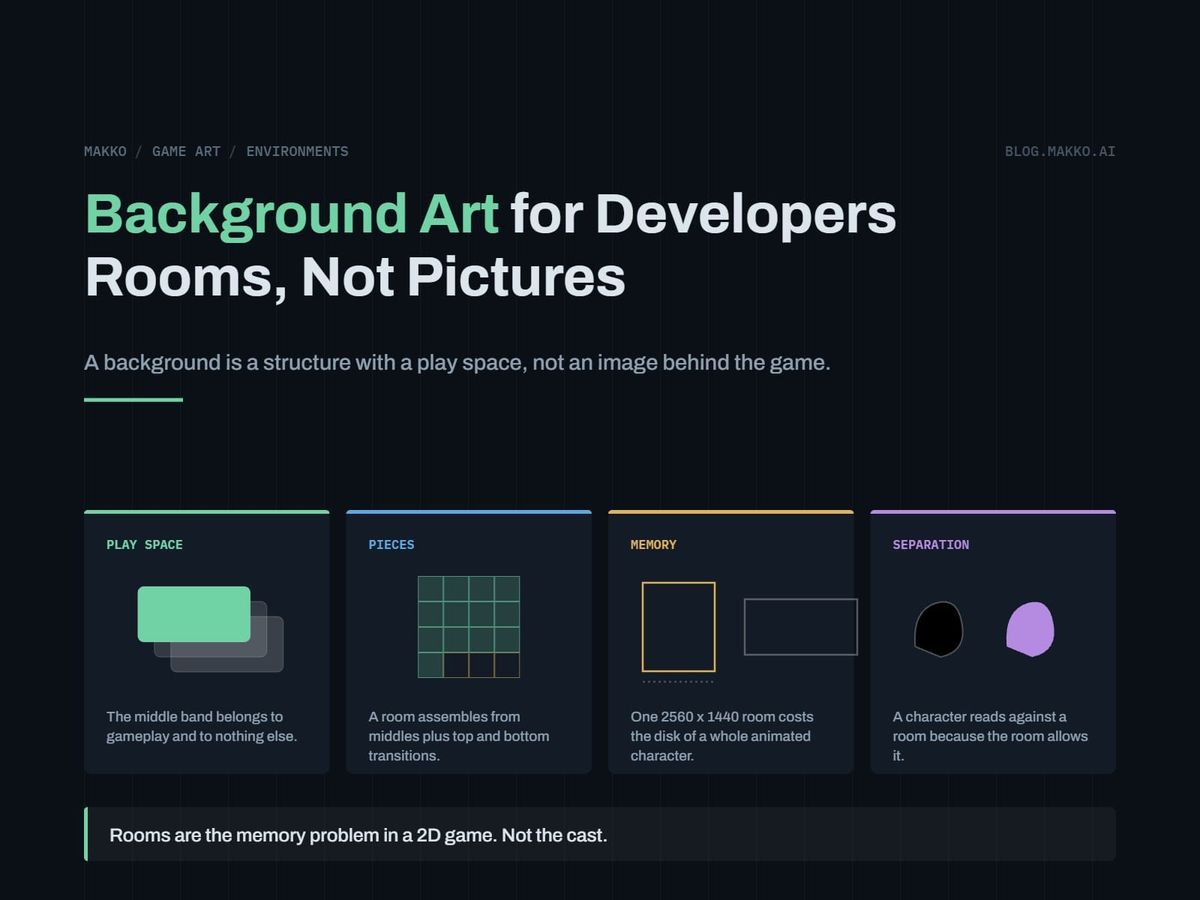
Your game has a character that moves, a UI that works, and a flat gray rectangle behind both. The rectangle has to become somewhere. What you do not know is how many somewheres the game needs, what each is made of, what size it ships at, or how to tell whether the file that comes back is correct.
The thing blocking you is not drawing skill. It is a mental model. Most developers commission a background as a picture: one image, one file, one approval. Nearly every environment problem in a small 2D game traces back to that assumption. A background is not a picture. It is a room, built from bands of depth, assembled from separate pieces, with the middle band reserved for gameplay and left quiet on purpose.
Switch models and the choices that looked artistic become choices you can specify in a document: how many pieces, at what resolution, which parts stay empty, what the character reads against. This article is that job.
The short version. A background is a structure, not an image: bands of depth, a clear play space, and a set of pieces that assemble into a room. Specify it that way and the decisions that look like taste become decisions you can write down and check. Budget hard for it, because the rooms are the memory problem and the cast is not: one 1920 x 1080 background takes 7.91 MiB of video memory against 2.38 MiB for a character sheet. Judge every room on three things: is the play band quiet, does a character read against it at play size, do the pieces assemble without a visible seam.
A picture hangs behind the game. A room is where the player stands.
The two models produce different briefs, different files, and different failure modes. Naming yours takes ten seconds and saves a month.
The picture model. You ask for an image of a spaceship corridor. You get a good image of a spaceship corridor, composed for a viewer standing still, with detail spread evenly. Then you drop your character in and three things break. The character disappears into the middle of the composition, because the most interesting part of a picture is usually its center and the center is where gameplay happens. You cannot extend the corridor, because the file ends where the image ends. And any change, a door moved, a second exit, a damaged version of the room, is a repaint.
The room model. You ask for a corridor as a set: sections that carry the length of it, top and bottom pieces that frame it, and variants of each. Detail is pushed to the top and bottom bands, away from where characters walk. Extending the corridor means placing another section. Damaging it means swapping in a variant, not commissioning a new room.
Everything below follows from picking the second model. The picture model is not always wrong: a fixed title screen or an illustrated cutscene is genuinely one picture. For a space the player moves through, it costs more than it returns.
The play space rule: the middle band belongs to gameplay
This rule does the most work, and it is specifiable without drawing anything. The horizontal band where characters move stays quiet. Low contrast, low detail density, no high-frequency pattern, nothing that draws the eye.
Real production does this at the file level rather than leaving it to taste. In a measured hallway set from a science fiction game, the top and bottom framing pieces are authored with the middle left empty. Not dimmed, not blurred. Empty. The framing art cannot compete with gameplay, because in the band where characters walk there is no framing art.
That is one sentence in a brief: name the vertical band the camera keeps characters inside, and require the top and bottom pieces to carry no rendered detail there. It converts an aesthetic judgment ("this feels busy") into a pass or fail check anyone can run.
Measure the band from your camera, not by eye. Your character is a known height in pixels and your camera has a known vertical range of character positions, so the band is the union of those. Quiet does not mean empty: floors, shadows and ground contact all live there. What stays out is anything the eye reads as a subject: signage, lit panels, hard silhouettes, dense pattern.
A background is a set of pieces, not a file
One hallway in that same game is twelve assets. The usual assumption is that eleven are rejected attempts. They are not. The set is a deliberate composition, authored as parts because the room is assembled rather than painted:
- Middle sections that carry the corridor itself and can be placed more than once to make the space longer or shorter.
- Top and bottom transition pieces that frame the play space and connect the corridor to ceiling and floor, authored with the center band clear.
- Variants of each, so the same corridor can read as a different stretch of ship without a new room.
The authoring sizes tell the same story. Middle sections are made square, at 2048 x 2048, while the assembled room ships at 1920 x 1080. A square source is not a mistake in aspect ratio. It is a tile authored to be placed, cropped and repeated, and squareness keeps it usable in more than one arrangement.
So specify how the room assembles before anyone renders a pixel of it. How many distinct sections. How many variants per section. Where the seams fall. That specification is short, entirely non-artistic, and it separates a room you can extend from a picture you can only replace. It belongs next to your character and interface rules, in an art bible.
This also changes room count. Count the genuinely distinct places your game needs, then get variety from variants and prop placement rather than new base rooms. Five rooms with three variants each reads as a bigger game than eight one-off pictures, and costs less.
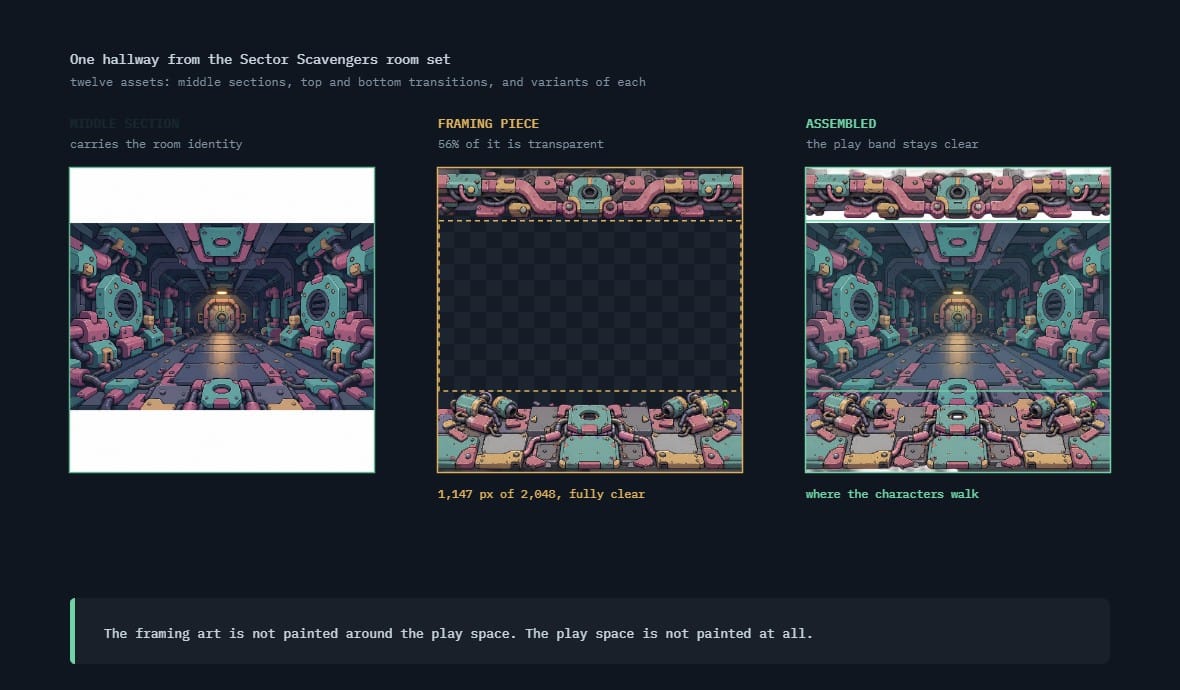 SS hallway room setmiddle section · framing piece · assembled
Backgrounds are the memory problem, not the characters
Developers optimize sprite sheets and ignore rooms. The measurements run the other way.
A fully animated character, six baked sheets covering walks, idle and two action cycles, comes to roughly 3 MB on disk. Backgrounds authored at 2560 x 1440 ran 2.7 to 3.8 MB. One wide background costs about the same disk as an entire animated character.
Video memory is more lopsided, and video memory is where you run out. Uncompressed, a 1920 x 1080 background is 7.91 MiB. A 600 x 1040 character sheet is 2.38 MiB. One room is roughly three and a half character sheets. A game with a dozen rooms loaded and a cast of six spends most of its texture budget on places, not people.
Optimization is the other number to know. Finished 1920 x 1080 rooms in that set land between 328 and 468 KB, against those 2.7 to 3.8 MB sources. The pixel count rises about 1.8 times and the file size roughly eight times, because the finals are flattened and optimized and the sources are not. Source files are not shipping files.
So author above ship size and ship at camera size, keep the oversized source out of the build, and check your engine's texture handling before committing to a resolution. The constraints that govern how large a sprite sheet should be apply with more force to a full-screen image.
Separation is the room's job, not the character's
When a character gets lost against a background, the instinct is to fix the character: an outline, a brighter palette, a rim light. That treats a room problem as a cast problem, and it fails the moment the character enters a second room. Separation comes from difference, and the room owns three of the four levers.
- Value. The strongest lever by a distance. If your character's mid-tones sit in the same value range as the wall behind them, no amount of color work saves it. Decide early whether characters read light on dark or dark on light, then hold that across every room.
- Detail density. A character is high-frequency: eyes, hands, gear, edges. Put that against a high-frequency wall and the eye has nothing to lock onto. The play band staying quiet is this lever pulled deliberately.
- Saturation. Rooms can afford to be more muted than their occupants. Give the cast the loudest color in the frame.
- Edge treatment. The only lever the character owns, and a supplement to the three above rather than a replacement.
The check is free: composite a character into the room, drop it to grayscale, shrink to real screen size. If you cannot instantly find the character, the room is wrong. Fix the room. The same reasoning governs interface art, where four decisions made once keep the HUD readable over every environment in the game.
The order of operations for a room set
Copy this and fill it in per room. Steps 1 to 5 happen before anyone renders anything.
# [ROOM NAME] - room set order of operations

1. CAMERA AND SHIP SIZE
   ship   = [     x     ]   author = [     x     ]
   camera = fixed / pans / follows character

2. MEASURE THE PLAY BAND
   character height = [    ] px
   feet Y, low/high = [    ] / [    ]
   PLAY BAND Y [    ] to [    ]  -> stays quiet

3. DECLARE THE PIECES
   middle sections = [  ] at [     x     ]
   top / bottom transitions = [  ] / [  ]
   variants per piece = [  ]   total assets = [  ]

4. SET THE SEPARATION CONTRACT
   cast reads = light on dark / dark on light
   room value range = [      ], saturation below cast

5. NAME THE REPEATS
   which section tiles, along which axis

6. RENDER MIDDLE SECTIONS FIRST, THEN FRAMING

7. ASSEMBLE AND TEST
   grayscale at play size / seam / play band audit

8. FLATTEN AND OPTIMIZE. SOURCES STAY OUT OF THE BUILD.
Step 2 gets skipped most, and it is the cheapest step in the list: arithmetic on numbers your code already has.
Three checks that catch most environment problems
None of these require you to paint, and together they catch most of what goes wrong with a room.
The grayscale play-size check. Composite your character into the room, convert to grayscale, scale to play size, and look for two seconds. If the character does not pop, the value relationship is wrong. Grayscale removes color, and color is the lever that fools you into thinking separation is fine.
The play band audit. Mask off everything outside the band you measured in step 2 and look at what remains. Anything reading as a subject rather than a surface gets removed or pushed up. Run this on the assembled room, not the pieces, since a quiet section plus a quiet transition can still composite into a busy band.
The repeat check. Place the same middle section twice, side by side, and watch the join with the camera moving at full speed. A seam visible standing still is a defect. So is a pattern visible only in motion, usually a distinctive mark reappearing at a regular interval, and that second kind ships most often.
Three checks, ten minutes per room, no craft knowledge involved. They mirror the three tests in the animation pillar, for the same reason: a developer can judge structural properties long before they can judge craft.
What genuinely needs an environment artist
Everything above is specification. Some things are not, and pretending otherwise produces rooms that pass every check and still look amateur.
You cannot reliably judge light logic: whether the light comes from somewhere, and whether every surface agrees about where. You will feel a room is flat without being able to say the ceiling is lit from a source the floor ignores. You cannot judge believable depth, where the bands read as physical distance rather than stacked layers. You cannot judge material, whether painted steel reads as painted steel. And you cannot judge place: whether a corridor says anything about who built it.
Those four are what an environment artist sells. If the budget covers one room done properly, spend it on the room the player sees first or occupies longest, and let the specification carry the rest. Systems that bake a whole collection at once, as Makko does, hold light direction and material treatment consistent across the set instead of reconciling them room by room.
Frequently asked questions
How many backgrounds does a small game need?
Count distinct places, not distinct scenes. A corridor, a bridge, a mess hall and an engine room is four rooms even if the game has thirty scenes, because scenes reuse rooms with different variants, props and lighting. Build the four properly before adding a fifth.
What resolution should I ship backgrounds at?
Ship at the resolution the camera displays, and author above it. In one measured set the rooms ship at 1920 x 1080 while their middle sections are authored at 2048 x 2048. Shipping the oversized source instead of a flattened final is the expensive mistake: the same room goes from under 500 KB to several megabytes, nothing visible gained.
Can I use one background with different color grading per room?
Yes, and it is among the highest-return tricks available to a small team. A hue shift plus a lighting change reads as a different place more often than developers expect. It fails when the architecture is distinctive enough that players recognize the geometry, so use it on generic spaces and author variants for signature ones.
Should I build backgrounds before or after the game is fun?
After, with one exception. Prototype with flat color blocks, but settle the play band and the light-on-dark or dark-on-light decision early, since both constrain camera framing and character design. Getting them wrong late means recomposing every room you have.
My character looks pasted on top of the room. What is wrong?
Usually contact, not style. A character with no shadow, no ground occlusion and no color influence from the room reads as a cutout however well matched the rendering is. Add a contact shadow and re-check before touching anything else. If it still reads as pasted, compare the light direction on the character against the room's.
Why does this say MiB and not MB?
Because memory and storage are counted in different bases. A mebibyte, MiB, is 1,048,576 bytes, or two to the twentieth. A megabyte, MB, is 1,000,000 bytes. Memory is physically addressed in powers of two, so every engine profiler reports the binary figure, and the numbers here match what Godot, Unity or Unreal will show you. Storefronts and drive manufacturers use the decimal one instead. At this scale the two differ by about five percent, so the same 1920 by 1080 background is 7.91 MiB and 8.29 MB. Same pixels, two labels. It is the same reason a drive sold as 1 TB shows up as 931 GB.