
How Many Frames Does a Game Animation Need?
The arithmetic, a starting table that sums to 47 frames per character, and why frames are not equally valuable inside one animation.
You have a character, a movement system that works, and a line in your asset brief reading "walk cycle". The number after it is blank, and every answer online is a different integer with no reasoning attached.
Frame count is not an aesthetic judgment. It falls out of four inputs: how long the action takes in seconds, the rate you play it back at, whether it loops, and how much screen time it gets. Given those, the arithmetic hands you a number, usually smaller than you expect.
What follows is the arithmetic, then a table, then the part nobody states: frames are not equally valuable inside one animation.
The short version. Frames equal duration in seconds times frame rate, and 2D games play at 12 or 24 frames per second for reasons inherited from hand-drawn animation. A character set of idle, walk, run, jump, attack, hit and death at typical counts comes to about 47 frames. Spend extra frames on anticipation and impact, never on a return stroke or the inbetweens of a walk. Most indie animations are too long, not too short.
Frame count is arithmetic before it is taste
The formula is one line. Frames equal duration in seconds multiplied by frame rate.
A walk taking two thirds of a second at 12 frames per second needs 8 frames. An attack resolving in half a second at 12 needs 6. A death lasting a second and a quarter needs 15, and you will cut it to 8 because the tail does nothing.
The input people get wrong is duration, because they never state it. They start from a count they saw somewhere, play it at the engine's default rate, then judge by feel. Reverse that. Decide in seconds how long the action should take, the same way you decide how long a jump arc lasts, then multiply.
Duration is a design decision you can defend. Frame count is a consequence. If an attack must resolve inside 0.4 seconds because that is your input window, the count is settled, and anyone handing you 14 frames answered a question you did not ask.
Why 12 and 24 are the rates that matter
Hand-drawn animation has run on a 24 frame per second timeline for a century, and most of it is drawn on twos: one drawing held two ticks, so 12 unique drawings per second. That is why 12 keeps appearing. It reads as motion, costs half of drawing on ones, and its staccato is legible rather than distracting.
The practical choices in games:
- 8 to 10 fps. Deliberately chunky. Good for idles, ambient loops, and anything stylized rather than smooth.
- 12 fps. The default for almost everything. Continuous enough to read, cheap enough to afford across a cast.
- 15 fps. A half step up for runs and fast attacks where 12 starts to strobe.
- 24 fps. Drawing on ones. Short bursts and hero moments only, because it doubles the art cost of every second.
Rate is a per-clip setting in every mainstream 2D engine and need not be uniform across a character. Playing an idle at 8 and an attack at 15 off the same sheet costs nothing extra. Set 12 as the project baseline and override per clip where the arithmetic demands it.
One technique belongs here because it is free. Holding a frame for two or three ticks gives you timing without giving you art. An impact pose held three ticks sells weight better than three drawings, and adds nothing to the sheet.
The starting table and the reasoning in each row
A full character set at counts that hold up in a shipped game, at 12 fps unless the row says otherwise. Read the reasoning column: that is what lets you derive your own.
| Animation | Frames | Loop | Reasoning |
|---|---|---|---|
| Idle | 4 | Yes | Played at 8 fps, so half a second per breath. A loop the player stares at for minutes must not repeat conspicuously. |
| Walk | 8 | Yes | Two strides at four key poses each: contact, down, passing, up. Drawings between those poses change almost nothing the eye can see. |
| Run | 8 | Yes | Same poses at 15 fps. You buy speed with the rate, not with frames. |
| Jump | 6 | No | Crouch, launch, rise, peak, fall, land. Peak and fall are held for the length of airtime, so airtime is decoupled from count. |
| Attack | 10 | No | The place extra frames reliably pay, and only in the first half. See the next section. |
| Hit | 3 | No | Impact, recoil, recover. A longer reaction steals control from the player. |
| Death | 8 | No | Plays once into a fade or a respawn, and ends on a held frame so the tail is free. |
That comes to about 47 frames per character. Hold that number: it is the unit you multiply for a cast of twelve, and it sets sheet dimensions and texture budget before a line is drawn.
Frames are not equally valuable inside one animation
This is the part that changes how you brief animation, and the reason two artists can deliver identical counts while one result feels great and the other feels like mush.
Take the 10-frame attack. The naive version spreads ten drawings evenly. The lopsided version works:
- Anticipation, 4 frames. The windup. Here the player reads what is coming and decides to block, dodge or commit. Every frame buys clarity, and on an enemy attack it buys fairness.
- Strike, 1 frame. The fastest pose in the animation, often a smear. It exists for one tick and the eye fills in the rest.
- Impact, 2 frames. Contact pose plus a held beat. Force lives here. Hold it rather than draw through it.
- Recovery, 3 frames. The return stroke. The cheapest frames present, and the first to cut when the budget tightens.
Run the same audit on a walk. Four key poses carry the entire read. A drawing inserted between contact and down is technically more motion and practically invisible at play size. Doubling a walk from 8 to 16 costs twice the art for a difference nobody names.
The rule: frames spent before an action buy more than frames spent after it. Anticipation is information. Recovery is bookkeeping. When an animation feels wrong but the count looks right, count the anticipation frames. There is usually one where there should be three.
It also tells you where to cut. To pull four frames out of a character, take them from recoveries across several animations rather than gutting one. Nobody notices a shorter return stroke. Everybody notices an attack that arrives without warning.
Loops and one-shots count differently
A loop has to close, so its count is constrained by the cycle's structure, not by duration alone. A walk needs an even number so the strides match. An idle breath needs its final frame adjacent to its first, or you get a pop every 0.75 seconds, forever.
Loops also carry the most cumulative screen time and the least per-viewing importance. A player sees the walk thousands of times and looks at it none of them. That argues for the minimum count that reads cleanly.
One-shots invert it. They play when the player is watching: the swing that killed them, the celebration, the death. No closure constraint, so the count comes from duration and from how much of it deserves detail.
Consequence: with a fixed budget per character, take frames off the loops and give them to the one-shots. A walk survives at 8. An attack does not survive at 4.
What six real sheets say about where frames get spent
We baked six sprite sheets for Mira Hearthkeeper in Wayfarer's Hearth. The counts came out like this.
| Sheet | Grid | Frames / slots | Cell |
|---|---|---|---|
| walk_s | 4 x 4 | 13 / 16 | 150 x 260 |
| walk_n | 4 x 4 | 13 / 16 | 146 x 260 |
| walk | 4 x 4 | 13 / 16 | 146 x 260 |
| idle | 5 x 4 | 18 / 20 | 119 x 260 |
| celebrate | 5 x 4 | 20 / 20 | 221 x 260 |
| serve | 5 x 4 | 20 / 20 | 184 x 260 |
Read the spend. Three walks at 13 frames each, the idle at 18, celebrate and serve at 20 apiece. The highest counts went to the two animations that are not locomotion. In a game about running an inn, serving is the verb the game is about and celebrating is the payoff. Walking, seen far more often and looked at far less, took the fewest.
That is the loop versus one-shot rule appearing in production without anyone arguing for it. Cell widths say it sideways: height locks at 260 across all six, while width floats from 119 on the idle to 221 on celebrate, set by the lateral room each action needs.
One detail matters more than it looks. Three sheets carry empty trailing slots: 13 frames in 16, and 18 in 20. A grid has to be a rectangle and an animation does not. If your importer derives frame count from the grid, those clips play blank frames at the end of every cycle, a stutter you will spend an hour blaming on your state machine. State frame count as data separate from grid dimensions. Put it in your written sheet spec next to frame size, order and padding. It is the field people forget and the field everything downstream depends on.
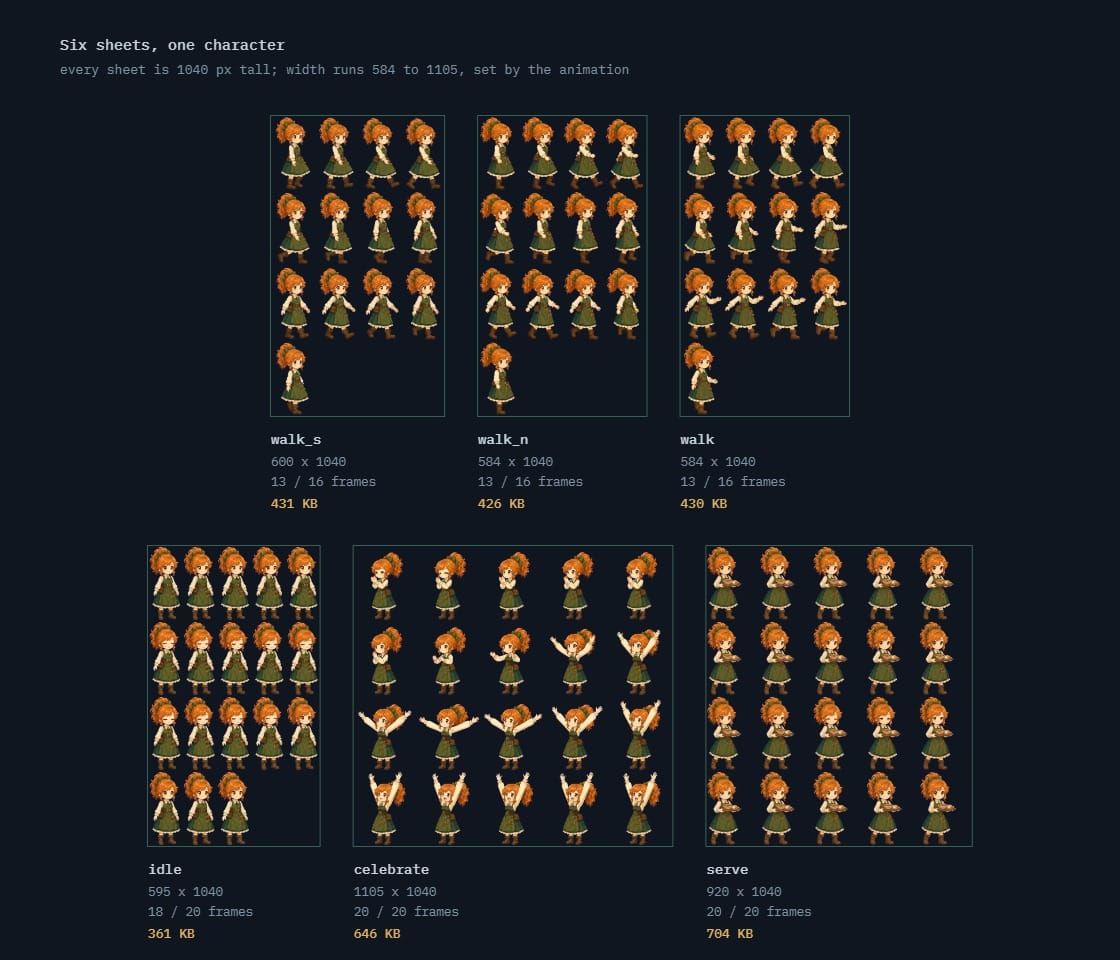 one character, six animations, six sheets13, 13, 13, 18, 20 and 20 frames · 361 KB to 704 KB
How to recognize a wrong count in your own build
Both failure directions have symptoms you have probably misdiagnosed.
Too few frames shows as sliding feet, a run that strobes at speed, and enemies whose attacks feel unfair. That last symptom matters most. When testers say combat is cheap, the reflex is to retune damage. Count the anticipation frames first: one windup frame gives the player a twelfth of a second to react, and no tuning fixes that.
Too many frames shows as a character that looks superb in the sprite viewer and feels bad to control. Animation length becomes input latency whenever the hurtbox activates on a specific frame. A 14-frame attack at 12 fps commits the player for over a second, and they will call the result floaty without once mentioning animation.
The second failure is the common one in indie projects, and the expensive one: those frames were paid for in production time and again in sheet area, video memory and load time. A short animation can be extended later. A long one already cost you twice.
The frame budget template
Fill this in before you commission or generate anything. It turns an open-ended art request into a specification with a number in every field.
# [GAME] - Frame Budget v0.1

## Playback
Base rate: 12 fps (on twos against a 24 fps display)
Per-clip overrides: idle 8 fps, run 15 fps
Holds allowed: yes (a held frame costs 0 art)

## Per character
state      seconds   fps   frames   loop
idle         0.75     8       6      yes
walk         0.67    12       8      yes
run          0.53    15       8      yes
jump         0.50    12       6      no
attack       0.67    12       8      no
hit          0.25    12       3      no
death        0.67    12       8      no
                     total    47

## Distribution rule, one-shots
anticipation  3   telegraph; cut last
strike        1   smear permitted
impact        2   contact + held beat
recovery      2   cheapest; cut first

## Declared separately from the grid
frame_count per clip: [n]   (grid slots may exceed it)
playback order: left to right, top to bottom
loop flag per clip: [yes/no]

## Cast math
47 x [n characters] = [total frames]
Check against sheet size and texture limits.
When a high count earns its cost
Everything above assumes a normal case. These are the cases where a high count is correct and cutting it is the mistake.
- The verb your game is built on. An action performed ten thousand times carries the game and deserves frames the rest of the cast never gets.
- Anything the camera pushes in on. Cutscene, portrait, finisher. Frames invisible at 32 pixels are visible at 300.
- Boss telegraphs. Anticipation is a fairness mechanic. A long readable windup lets a boss hit harder without feeling cheap.
- Transitions between states. Three frames connecting idle to run do more for perceived quality than eight more inside either. Most projects skip these, then wonder why the character feels snappy in a bad way.
- One signature loop. A single high-count animation on the character the player watches most, with the rest at baseline, reads as polish. Every character at high count costs ten times as much.
Note what is absent: walk cycles, generic enemies, props, anything offscreen most of the game. Those are where projects overspend and where cutting to the arithmetic minimum costs nothing visible.
Frequently asked questions
How many frames should a walk cycle have?
Eight at 12 fps answers almost every project, built from four key poses per stride. Six works if your style is deliberately chunky. Twelve to sixteen is defensible on a character with heavy secondary motion such as a long coat, and the example above landed at 13. Past that you pay for motion players will not register.
Can I use different frame rates on one character?
Yes, and you should. Rate is a per-clip property and does not change the sheet. It is also the cheapest fix for an animation that feels wrong: change the rate before you change the drawings.
What if the frames I receive do not match my code?
Make animation length data rather than a constant. Padding a short cycle by duplicating frames is fine on idles and distant characters and reads as a hitch on anything the player controls. Ask for a re-cut only on assets with real screen time. It is the same contract problem that appears when you swap placeholder art for the real thing: state counts in the brief and it never arises.
Does a higher frame count mean a bigger sheet?
Directly. Sheet area is frame count times cell size, rounded up to a rectangle that has to fit your platform's texture limit. Doubling a walk from 8 to 16 doubles sheet area and video memory. Decide counts, then size sheets, never the reverse.
How do I count frames for an eight-direction character?
Multiply, then look for mirrors. A 47-frame set in eight directions is 376 frames, a different scale of project. Most games shipping in eight directions draw four and mirror horizontally. Settle this before the first animation: retrofitting directional variants onto a finished set means redrawing everything.